The Monitor Alert Delay—often called the Grace Period—defines how long Ok Alone waits after a worker misses a check-in before notifying their Monitor. By adjusting this delay, you can reduce false alarms and give workers a short window to check in before an alert is sent. Follow the steps below to view and change the Monitor Alert Delay settings.

What Is the Monitor Alert Delay (Grace Period)
Monitor Alert Delay (Grace Period): The amount of time between a missed worker check-in and when the Monitor receives an alert.
If a worker fails to check in at the scheduled time, Ok Alone waits for the Grace Period before escalating to the assigned Monitor.
A properly configured Grace Period prevents immediate alerts for minor delays (e.g., if a worker’s phone rings or they’re temporarily offline).
How to Set the Monitor Alert Delay
Log in to the Ok Alone dashboard at https://my.okalone.net using an Admin account.
In the left-hand toolbar, click Settings.
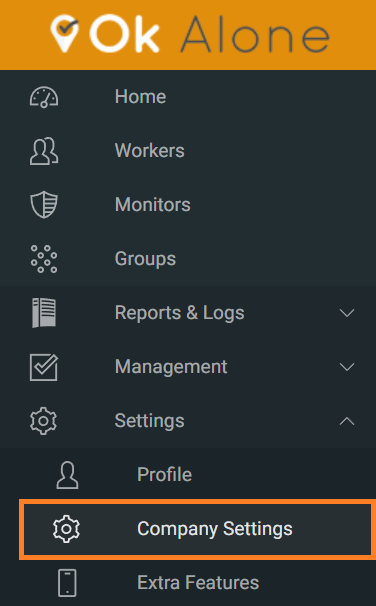
Under Settings, find the Monitor Alert Delay dropdown.
-
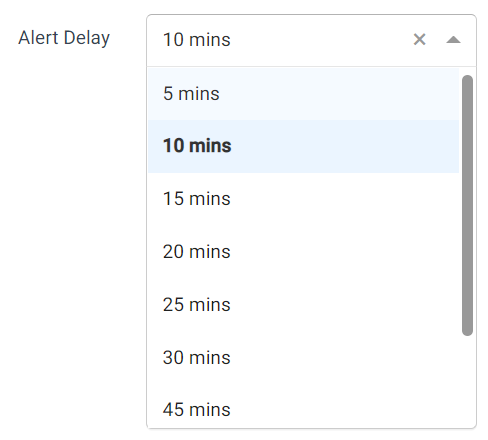
Click the dropdown and select the desired delay:
5 minutes
10 minutes
15 minutes
20 minutes
25 minutes
30 minutes
Scroll to the bottom of the page and click Update to save your changes.
Once saved, the new Grace Period applies to all workers in your account. If a worker misses a check-in, their Monitor will be notified only after this delay has elapsed.
Flexible Alert Delays
Ok Alone also offers Flexible Alert Delays for specific check-in types, allowing you to customize response times for high-risk scenarios:
Worker Down Check-Ins: If Man Down detection is enabled and a worker appears immobile, you can set a shorter Grace Period so that Monitors receive alerts more quickly.
High-Risk Check-Ins: When a worker switches to a high-risk status (for example, entering a hazardous area), you can define a shorter delay for missed check-ins during that period.
To configure Flexible Alert Delays:
Go to Settings → Flexible Alert Delays (if available in your plan).
Choose separate delays for Worker Down and High-Risk incidents—typically shorter than the standard Grace Period.
Click Save to apply both standard and flexible delays.
Feature Management Reminder
Monitor Alert Delay settings are part of the Communication Plan. If you do not see the Monitor Alert Delay option:
Navigate to Settings → Extra Features.
Under Communication Plan, ensure Monitor Alert Delay (Grace Period) is checked.
Click Update Your Feature Settings.
Best Practices
Balance Responsiveness and False Alarms
Set a Grace Period that accommodates minor connectivity issues (5–10 minutes) without delaying real emergencies too long.Shorten Delays for High-Risk Scenarios
For Worker Down or High-Risk check-ins, choose a much shorter delay—often 1–3 minutes—to ensure an immediate response.Communicate with Monitors
Let your team know if you adjust the Grace Period so they understand why they might receive alerts sooner or later.Review Regularly
Periodically revisit the delay settings to make sure they still match your operational needs (e.g., if workers change locations or connectivity improves).
If you have any questions or need assistance setting up your Monitor Alert Delay, email customer.support@ok-alone.com